

D-Secure File Eraser Software — Permanently Delete & Shred Files
D-Secure File Eraser Software allows you to permanently delete files and securely shred folders beyond recovery. File wipe software and secure file shredder for Windows 10, 11 & Server with digitally signed erasure reports.
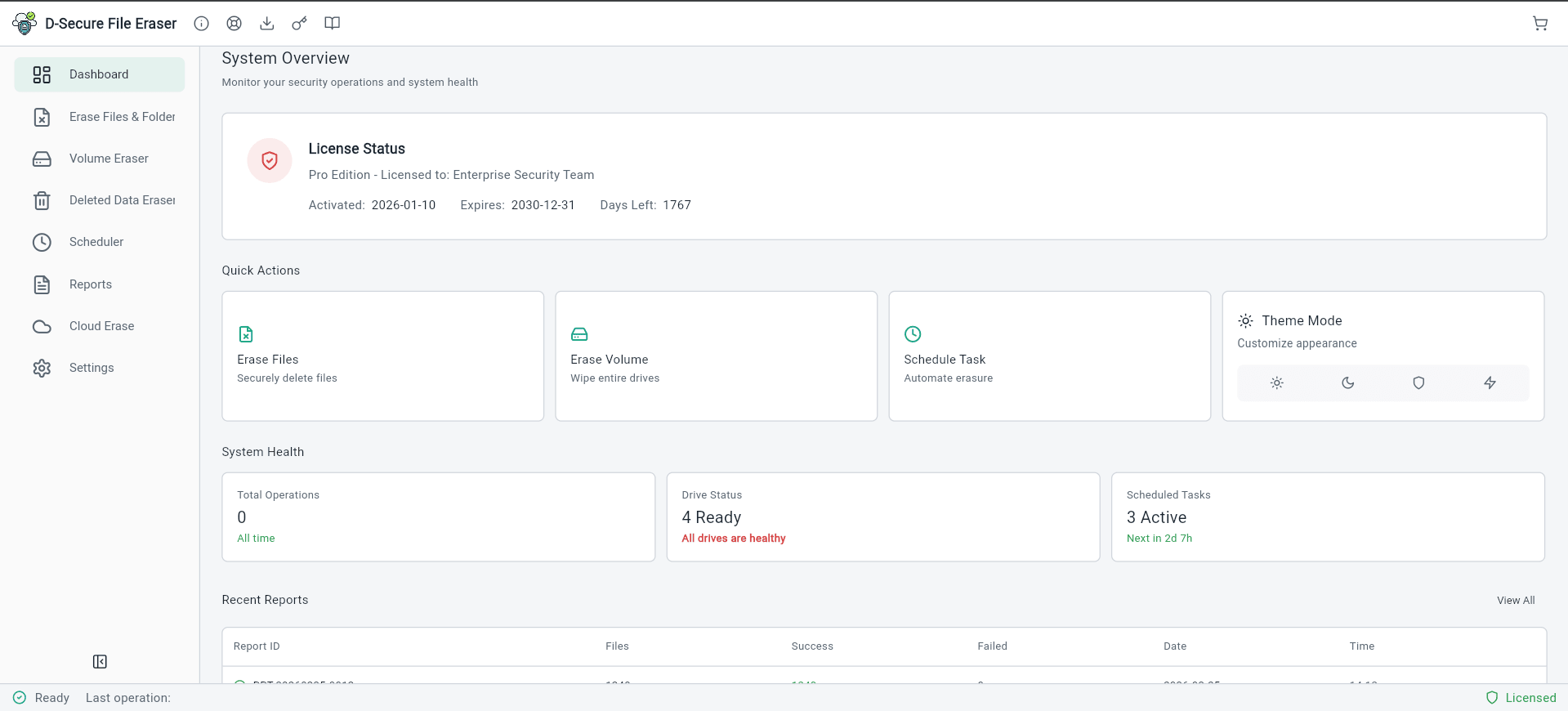
File Eraser
Secure Data Destruction
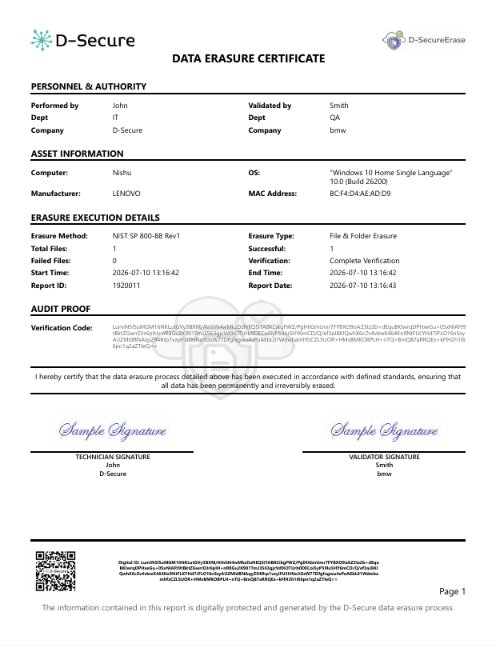
Erasure Reports
View detailed erasure reports required for compliance and auditing purposes.

Why Choose D-Secure File Eraser?
- Securely erase specific files and folders without wiping the entire drive.
- Sanitize free space to permanently remove traces of previously deleted files.
- Meets NIST 800-88 and DoD 5220.22-M data sanitization standards.
- Automate file erasure tasks and generate compliance-ready certificates.
What You Can Erase
Comprehensive data destruction capabilities for all types of sensitive information
Files & Folders
Regulatory data wiping for individual files, folders, and partitions without affecting the entire drive, with multi-pass overwrite algorithms.
Free Space & Deleted Data
Permanently wipe unused disk space and previously deleted files to prevent any chance of forensic recovery.
Cloud Storage Data
Remove data from connected cloud platforms like Google Drive, OneDrive, Dropbox, and iCloud.
High-Speed Erasure
Simultaneously erase multiple files and drives with optimized algorithms for maximum efficiency.
Automate Erasure Tasks
Schedule automatic data destruction routines based on specific triggers or time intervals.
Volume Erase
Completely erase volume partitions including boot sectors, partition tables, and all data structures.
See File Eraser in Action
Watch how D-Secure File Eraser permanently destroys sensitive data with audit-ready documentation
How To Use D-Secure File Eraser?
Downloadable Software For Windows, Mac (Coming Soon) & Linux OS
Download D-Secure File Eraser Software
Install D-Secure File Eraser
Select Files/Folders/ Volumes To Erase
Erase & Save Report
D-Secure File Eraser can be deployed across Windows, Mac (Coming Soon), and Linux systems to permanently erase files, folders, and traces beyond recovery.
Select the file/s or folders or search the name to erase. The Cloud allows administrators to execute and monitor erasures remotely across multiple endpoints as well.
Compliance-Ready by Design
D-Secure File Eraser supports organizational compliance initiatives by aligning with widely accepted data protection principles and secure erasure best practices
NIST 800-88
Guidelines for media sanitization ensuring data is permanently irretrievable.
DoD 5220.22-M
Standard for data erasure used by the U.S. Department of Defense.
GDPR
Supports an organization's own 'Right to Erasure' processes for personal data.
HIPAA
Protects sensitive patient health information from unauthorized access.
SOX
Mandates secure data lifecycle management for corporate financial records.
PCI-DSS
Requirements for secure disposal of cardholder data and sensitive info.
Multi-Platform Support
Full support across your entire technology ecosystem
Windows
Windows 10, 11 & Server 2016+. Minimum Requirements: 64-bit operating system, x64 processor, and 4GB RAM.
macOS (Coming Soon)
Monterey, Ventura, Sonoma, Sequoia etc.
Linux (Coming Soon)
Ubuntu, CentOS, Debian, RHEL etc.
Powerful Features
Enterprise-grade capabilities designed for security professionals
27+ Erasure Methods
Support for NIST 800-88, DoD 5220.22-M, Gutmann, HMG, and other internationally recognized erasure methods.
Multi-Language Support
User-friendly interface available in 20+ languages for global enterprise deployment.
Cloud Data Erasure
Securely remove files from connected cloud storage services with verifiable deletion.
Scheduled Erasure
Automate data destruction with scheduled tasks for regular cleanup and compliance maintenance.
Drag & Drop Selection
Intuitive file selection with drag-and-drop interface for quick and easy data erasure.
Detailed PDF Reports
Generate comprehensive, tamper-evident erasure certificates for audit and compliance documentation.
Enterprise Scalability
Deploy across thousands of endpoints with centralized management and monitoring.
Custom Branding
White-label solution with your organization's branding for client-facing reports.
Encryption
Encryption protects data before erasure, preventing unauthorized access during the process.
Centralized Logging
Maintain a centralized immutable log of all erasure activities for security audits.
Use Cases
Built for IT teams, ITADs and enterprises
Individual Privacy Protection
Stop identity theft before it happens. Recovered financial records and personal photos can be used for blackmail if not permanently erased.
Enterprise Data Governance
Don't let your secrets become public. Deleted corporate data in the wrong hands leads to massive financial loss and reputation destruction.
Cloud Data Exposure
Deleting files in the cloud doesn't mean they are gone. Ghost copies leave you vulnerable to breaches indefinitely without secure erasure.
Avoid Compliance Fines
Regulatory fines can bankrupt a business. Failing to prove verifiable data destruction can lead to penalties under GDPR, HIPAA, and SOX.
Technical Blogs
Expert insights on data security, erasure standards, and best practices
How to Securely Erase Local LLM Data from Enterprise AI PCs
Learn where Ollama, LM Studio, GPT4All and Jan store models, chats and vector data—and how enterprises can securely sanitize AI PCs.
Data Erasure Myths Debunked
Formatting, deleting, degaussing SSDs and shredding: four common data erasure myths debunked, with a quick myth vs. reality table to keep your data safe.
How to Wipe or Format an SSD from BIOS: Secure Erase Steps
Wipe, format or reset an SSD from BIOS or UEFI: find the Secure Erase option, run it on SATA and NVMe drives, and what to do if your BIOS has none.
Related Products
Explore the full D-Secure data security suite
Frequently Asked Questions
When you delete a file using the Recycle Bin on Windows or Trash on macOS, the operating system only removes the directory pointer to the file, leaving the actual file contents intact on disk sectors until overwritten by chance. To permanently delete files so they cannot be recovered by forensic software or data recovery tools, you need a dedicated file shredder like D-Secure File Eraser. It uses multi-pass overwriting algorithms (such as DoD 5220.22-M and NIST 800-88 Clear) to overwrite the selected files, folders, and free space with random patterns, and generates an auditable deletion certificate for compliance.
Deleting a file through your operating system — whether by emptying the Recycle Bin on Windows, using the Trash on macOS, or issuing a rm command on Linux — does not remove the underlying data from your storage device. The operating system simply removes the file's directory entry, marking that space as available for future use. The original file content remains physically intact on the disk and is fully recoverable using widely available file recovery software, sometimes in seconds. Permanent file erasure, by contrast, overwrites the actual data stored at that location with new patterns, rendering the original content unrecoverable. D-Secure File Eraser applies recognised overwriting algorithms — drawn from a library of 27+ erasure methods — directly to the file's storage sectors, then verifies that the overwrite completed successfully. This distinction matters for privacy compliance: laws such as GDPR are technology-neutral and require secure erasure and accountability, but do not prescribe a method or certificate.
D-Secure File Eraser is designed for selective, targeted sanitization rather than full-drive erasure, giving organisations precise control over exactly which data is removed. It can permanently erase individual files, entire folder structures, free space on a drive (where deleted file remnants may still reside), and system-generated traces such as temporary files, browser caches, application logs, and other residual data left behind by day-to-day software use. Partition-level erasure is also supported, allowing an entire logical partition to be sanitized without affecting other partitions on the same physical device. This range of targets makes File Eraser suitable for a variety of use cases: targeted erasure of specific documents prior to device handover, recurring sanitization of sensitive working files after a project closes, removal of regulated data such as personally identifiable information (PII) from active machines, and cleanup of system traces that could expose user activity. The software supports standard NTFS, FAT32 and exFAT file and partition structures.
Yes. One of D-Secure File Eraser's notable capabilities is its ability to erase locally stored traces left by cloud storage synchronisation clients, including Google Drive, Microsoft OneDrive, Apple iCloud, and Dropbox. When you use these services, the synchronisation client typically caches files, metadata, and activity logs on your local machine — in addition to storing the file in the cloud itself. Simply revoking cloud access or uninstalling the sync client does not remove these local traces, which can include partial file copies, access history, and thumbnail previews. D-Secure File Eraser targets and permanently overwrites these locally cached traces, reducing the residual data footprint on the device. It is important to note that It is important to note that File Eraser operates on locally stored data only — it does not reach into cloud storage services directly or delete files from remote servers. Removing data from cloud storage itself requires action through each platform's own deletion and account management tools. The file sanitizer detects and cleans sync artifacts across all major cloud client directories.
File recovery is possible after standard deletion because the operating system only removes the logical reference to a file, leaving the underlying data intact on the storage medium until that space is overwritten by new content. Recovery tools scan for these intact data remnants and reconstruct files that have not yet been overwritten. D-Secure File Eraser closes this recovery window by overwriting the actual storage sectors that contained the file's data with new patterns before that space is ever reused by the operating system. The overwrite is then verified to confirm completion. Because the original data has been physically replaced at the sector level, recovery tools find no intact data to reconstruct — the file cannot be restored. For NAND flash-based storage (SSDs, NVMe drives), where wear-levelling may complicate standard overwriting, D-Secure File Eraser applies appropriate algorithms from its library of 27+ erasure methods matched to the media type. For specific algorithm selection recommendations for your storage environment, visit the D-Secure compliance page or use the free NIST 800-88 Checker tool.
D-Secure File Eraser currently supports 64-bit Windows 10, 11 and Server 2016+. macOS and Linux versions are coming soon. Each erasure operation generates a PDF audit report confirming the files, folders, or traces removed, the algorithm applied, and the verification result.
Yes. D-Secure File Eraser generates a PDF audit report at the completion of each erasure session, providing a documented record of the operation. The report records the key details of the erasure event — including the files, folders, or trace categories removed, the wiping algorithm applied, the date and time of the operation, and confirmation that the process completed successfully. This documentation is important for organisations that must demonstrate compliance with data protection regulations requiring evidence of proper data disposal. GDPR Article 17, for example, does not simply require that data be erased — it requires that organisations be able to demonstrate that erasure occurred when requested or required. Similarly, HIPAA and PCI DSS 4.0 compliance programmes typically require auditable records of data destruction events as part of formal compliance reviews. JSON output allows the report data to be imported into asset management or compliance tracking systems for centralised record-keeping. Reports can be exported in standardized PDF and structured JSON formats for automated compliance ingestion.
D-Secure File Eraser supports compliance with data protection regulations that require organisations to permanently remove personal and sensitive data when it is no longer needed or upon a data subject's request. Relevant frameworks include: GDPR Article 17 (Right to Erasure), which requires that personal data be permanently deleted under specific conditions and that deletion be documentable; HIPAA (Health Insurance Portability and Accountability Act), which governs the secure disposal of Protected Health Information (PHI) and applies to healthcare providers, insurers, and their business associates; PCI DSS 4.0, which requires that cardholder data be rendered unrecoverable when no longer required for business purposes; India's Digital Personal Data Protection (DPDP) Act 2023, which imposes data erasure obligations for personal data processed within India; and SOX (Sarbanes-Oxley Act), relevant to financial records held on employee workstations. File Eraser's PDF audit reports can support your own documentation under these frameworks; compliance remains your organisation's responsibility. For a detailed compliance mapping, visit the D-Secure compliance page. For specific legal interpretation relevant to your jurisdiction, consult your legal and compliance team.
Yes. Free space erasure is a dedicated function within D-Secure File Eraser and addresses a specific data security risk that standard file-level deletion leaves unresolved. When files are deleted through the operating system, the storage space they occupied is marked as available but the data itself is not overwritten. Over time, a drive's "free space" accumulates intact remnants of previously deleted files — potentially including sensitive documents, personal information, credentials, and other confidential data — that remain recoverable by anyone with access to a recovery tool and the physical or logical access to the drive. Free space erasure resolves this by scanning the unallocated regions of a drive and overwriting them with new data patterns, eliminating recoverable remnants without affecting the files currently in active use on the same drive. This is particularly valuable for devices that are being handed to a new user within an organisation, returned after a repair, or otherwise changed hands while remaining in active service. After free space erasure, a PDF report is generated confirming the operation.
Yes. D-Secure File Eraser includes scheduled erasure functionality, allowing organisations to configure automated, recurring sanitization tasks rather than relying on manual, ad-hoc deletion. This capability is particularly important for enterprise environments where sensitive data is generated continuously — such as temporary files from business applications, working copies of regulated documents, cache data from internal portals, and system trace files that accumulate over time. Scheduled erasure enables IT security teams to define policies once and enforce them consistently across endpoints without requiring manual intervention for each event. This reduces the risk of data accumulating in unmonitored locations between manual cleanup cycles and supports a more defensible, process-driven approach to data hygiene. Scheduled operations generate the same PDF audit report as manual erasure sessions, ensuring that recurring compliance documentation is produced automatically. Automated scheduling supports daily, weekly, and event-driven sanitization tasks.
D-Secure offers two distinct erasure products that serve different purposes within an organisation's data security programme, and understanding which one to use depends on the specific scenario. D-Secure Drive Eraser performs full-drive, sector-level sanitization of an entire storage device — including HDDs, SSDs, NVMe drives, and RAID arrays. It is the correct tool when a device is being decommissioned, redeployed to a different user, sold, donated, or sent for recycling, and the entire drive needs to be returned to a clean state. It applies NIST SP 800-88 Clear and Purge methods and deploys via USB boot or PXE network boot. It is priced at $25.00 per licence (pay per use). D-Secure File Eraser performs selective, targeted sanitization of specific files, folders, free space, system traces, and cloud-drive residue on an active, in-use machine. It is the correct tool for ongoing data hygiene, GDPR right-to-erasure requests on active systems, and post-project data cleanup without taking the device out of service. It is priced at $40.00 per year (annual subscription). Both products generate PDF audit reports.
D-Secure File Eraser is designed with enterprise environments in mind, where data hygiene obligations extend across large numbers of endpoints managed by an IT or security team rather than individual users. File Eraser currently runs on 64-bit Windows; macOS and Linux versions are coming soon. Scheduled erasure capabilities allow IT teams to define and enforce data sanitization policies consistently across endpoints without relying on user-initiated actions, reducing the risk of human error or non-compliance. The PDF audit reports generated after each session can support the per-operation documentation in your enterprise compliance programme under GDPR, HIPAA and PCI DSS 4.0; compliance remains your organisation's responsibility. For organisations that also need to sanitize entire drives — for example, as part of a device retirement or lease return programme running alongside ongoing file-level hygiene — File Eraser works as a complement to D-Secure Drive Eraser rather than a replacement.
D-Secure File Eraser provides access to a library of 27+ erasure methods, covering both single-pass and multi-pass overwriting methods drawn from globally recognised data sanitization frameworks. Single-pass overwriting methods are generally considered sufficient for modern storage media under NIST SP 800-88 guidance, which notes that additional overwrite passes do not materially increase the assurance level for contemporary drives. Multi-pass methods, such as DoD 5220.22-M (3-pass and 7-pass variants) and others, remain in use by organisations whose internal policies or specific regulatory frameworks require them. The appropriate algorithm depends on three factors: the sensitivity of the data being erased, the type of storage media (magnetic HDD vs. NAND flash SSD), and the regulatory framework or internal policy your organisation must satisfy. For example, NIST 800-88 Clear-category methods apply to lower-sensitivity scenarios on magnetic media, while Purge-category techniques are recommended for flash-based storage. The free NIST 800-88 Checker tool on the D-Secure website helps identify the correct sanitization category for your media type and sensitivity level. For guidance on selecting the most appropriate algorithm for a specific compliance requirement, contact the D-Secure technical team.
To delete a file permanently from your PC so it cannot be recovered, using the standard Recycle Bin or Shift+Delete is not sufficient. Windows only deletes the file allocation table reference, leaving the raw content on the drive sectors where file recovery software can retrieve it. D-Secure File Eraser permanently overwrites the physical sectors with standardized wiping patterns (NIST SP 800-88, DoD 5220.22-M), so that standard file recovery software cannot restore the data.
In Windows 10 and 11, permanently deleting files requires dedicated file shredding software. With D-Secure File Eraser installed, you can simply right-click any file, folder, or empty Recycle Bin, select 'Secure Erase with D-Secure', and choose your preferred erasure algorithm. The tool overwrites the sectors, sanitizes file metadata, and generates an auditable report confirming the erasure.
To ensure files on a computer hard drive (HDD or SSD) cannot be recovered, the physical sectors where the file previously resided must be overwritten. D-Secure File Eraser provides targeted file and folder shredding as well as a 'Wipe Free Space' capability that cleans unallocated disk space, overwriting old deleted file remnants without affecting active system or user files.
D-Secure File Eraser automatically generates a digitally signed, tamper-evident PDF audit certificate upon completing each erasure operation. This certificate documents the file names, sizes, timestamps, the wiping method applied, hardware details and the verification result, giving you supporting evidence for your own audit documentation under GDPR, HIPAA, SOX and PCI DSS. Compliance remains your organisation's responsibility.
D-Secure File Eraser is a file eraser for Windows 10, 11, and Windows Server. It combines multi-algorithm file wiping, automated scheduled wiping, cloud sync residue removal, recycle bin sanitization, and tamper-evident PDF reporting with a user-friendly interface and enterprise deployment options.
Talk to Our Data Security Experts
Get personalized guidance on deployment, licensing, and audit-ready data erasure strategies tailored to your organization's needs.
- Enterprise & SMB licensing options
- Compliance-focused implementation
- White-label branding available
- No-obligation consultation